LearnChoosing a program
Futures Trading Sessions, Flat Times, and Contract Rollover
A futures trading schedule must satisfy the product's exchange hours, the prop firm's flat-by deadline, and the rules for the dated contract you actually trade. Put those checks on one calendar before the session begins. A market can still be open after your account must be flat, and a chart can change contracts without confirming what is in your order ticket.
On this page
This guide builds that operating calendar with one hypothetical week and current examples from TradeDay, Tradeify, Earn2Trade, CME Group, and TradingView. Named policies were checked on 6 October 2026. They illustrate particular mechanisms; they do not establish one schedule for every firm or futures product.
When does a futures trading day begin and end?
A calendar date, an exchange session, and an account's rule day can have different boundaries. An evening trade may belong to the following exchange trading date even though your local calendar still shows today. Midnight on your computer does not establish the session boundary.
Start with the specific exchange product, then add the account's restrictions. The practical questions are:
| Calendar entry | What it tells you | What it does not establish |
|---|---|---|
| Product session | When the exchange permits trading in that product | Whether your firm permits you to hold a position throughout it |
| Firm flat-by deadline | When the applicable account must have closed positions and, where required, canceled working orders | That an order sent at the deadline will finish in time |
| Account rule day | The period used for a daily reset or qualifying-day calculation | That every other account rule uses the same boundary |
| Dated-contract deadline | Which expiration may be traded and when it must be replaced or closed | That a continuous chart has selected the right contract for your account |
Also distinguish an exchange being available for order entry from being open for matching trades. CME's calendar describes separate pre-open, open, paused, and closed states. A pre-open period is not ordinary continuous trading. Select the product and date in the CME trading-hours calendar.
Keep the firm's daily-loss reset and qualifying trading-day definition beside this schedule if they matter to the account. Neither should be inferred solely from the exchange session label.
What does the firm's flat-by deadline require?
Treat a flat-by deadline as a required account state. If the policy requires no open positions and no working orders, both conditions must already be true at the cutoff. Closing a position is not sufficient evidence that every remaining entry, stop, or target order has been canceled.
The exchange's closing time is only one input. A firm can require an earlier exit, and the permitted window can depend on the product or account stage.
| Official example | Scope and stated timing | Calendar implication |
|---|---|---|
| TradeDay | Its trading-time policy requires an exit ten minutes before the product closes. The page warns that its 15:50 CT automated liquidation does not handle products that close earlier; for those, the trader must be flat with no working orders before that product's close. | Record the product's own close and the required lead time. Do not substitute one automation time for every instrument. |
| Tradeify | The page covers Evaluation, Sim Funded, and Live accounts and states a flat time of 16:45 ET on regular days and 12:59 ET on holiday-shortened days, with holiday hours announced in its Discord server. | Put the firm deadline beside the exchange schedule and check the holiday announcement for the date. |
| Earn2Trade | For Gauntlet Mini and Trader Career Path evaluations, the general flat window is 15:50–17:00 CT. The listed grain contracts also have a 07:45–08:30 CT break and a 13:20–17:00 CT restriction. | The general afternoon cutoff is not the complete schedule for every permitted product. Positions and working orders are both covered. |
These examples are not interchangeable. Use the account's current notice, including any narrower product restriction. If automated liquidation exists, find out what it covers and inspect the account afterward; the automation is not your calendar.
Record the stated consequence as well. Tradeify says positions still open at the close are closed automatically without failing the account, though fills may be poor. TradeDay says it does not fail traders for accidental breaches of its permitted times, but abuse of the policy can cost the account, and it will not reset an account if its software fails to liquidate a position and a drawdown limit is breached as a result.
For the separate question of whether you may carry exposure across a daily close or weekend, see overnight and weekend holding rules. Here, the task is to turn the applicable permission into a usable daily timetable.
How do holidays and time zones change the plan?
Check the product's dated holiday schedule and the firm's corresponding announcement together. An ordinary weekday template can be wrong on a shortened session. A date labeled as a holiday also does not, by itself, tell you every product's opening and closing time. Some firms add their own closure: Earn2Trade's evaluation rules exclude public holidays as well as exchange closures for Gauntlet Mini and Trader Career Path. Check which dates the account's holiday notice covers.
CME's trading-hours page provides date and product filters and says times are US Central unless otherwise stated. Read the schedule's own time-zone label rather than applying that convention to every linked document or another exchange.
Keep the original zone in your record and convert the exact date into your local zone. Use a calendar setting such as America/Chicago for Central Time or America/New_York for Eastern Time rather than storing a fixed UTC offset for the entire year. Recheck conversions around clock changes, especially if your location changes clocks on different dates.
Set your own exit reminder earlier than the mandatory deadline, allowing time to close and verify the account. The reminder is an operating choice, not a grace period granted by the firm. If the exchange notice and the firm notice appear inconsistent, resolve that discrepancy before opening a trade that depends on the disputed window.
What does one complete operating week look like?
Consider an undated hypothetical week for one futures product and one account. This is an invented teaching schedule, not a CME holiday calendar or any named firm's program.
- All times are Central Time within a week that has no clock change.
- A normal session opens at 17:00 on the preceding day and closes at 16:00 on its trading date. There is no Friday-evening reopening.
- The hypothetical firm requires zero open positions and zero working orders ten minutes before each product close. That state must be reached by the deadline and maintained until the next permitted opening.
- Thursday is an announced shortened session with a 12:00 product close and an 11:50 firm deadline. It reopens at 17:00 that evening.
- Contract A is the permitted dated contract through Thursday's shortened session. A firm notice requires Contract B from Thursday 17:00, the opening of Friday's session. A and B are labels, not tradeable symbols.
- No other restrictions affect this model. It plans permitted windows; it does not execute trades or model P&L, loss resets, or qualifying-day credit.
| Trading date | Session opens, CT | Flat with no working orders by | Product closes | Contract for that session | Next permitted opening |
|---|---|---|---|---|---|
| Monday | Sunday 17:00 | Monday 15:50 | Monday 16:00 | A | Monday 17:00 |
| Tuesday | Monday 17:00 | Tuesday 15:50 | Tuesday 16:00 | A | Tuesday 17:00 |
| Wednesday | Tuesday 17:00 | Wednesday 15:50 | Wednesday 16:00 | A | Wednesday 17:00 |
| Thursday | Wednesday 17:00 | Thursday 11:50 | Thursday 12:00 | A | Thursday 17:00, using B |
| Friday | Thursday 17:00 | Friday 15:50 | Friday 16:00 | B | Sunday 17:00, using B |
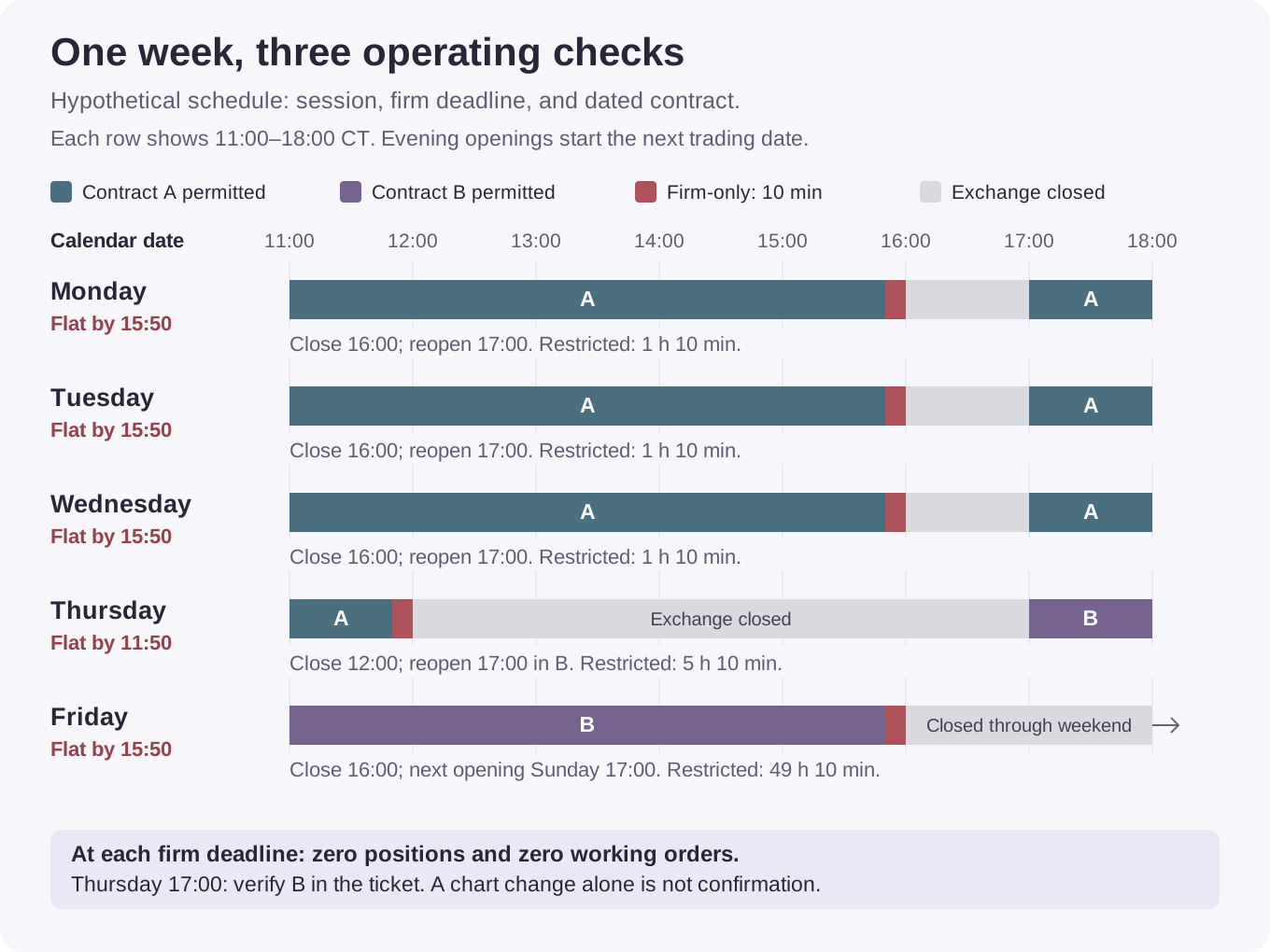
The normal restricted interval is 70 minutes, from 15:50 until 17:00. Ten minutes come from the firm's earlier cutoff; the remaining hour comes from the product closure.
On Thursday, the interval is 5 hours 10 minutes, from 11:50 until 17:00. A recurring 15:50 reminder would be four hours too late. On Friday, the interval lasts 49 hours 10 minutes, from 15:50 until Sunday 17:00, under this example's no-clock-change assumption.
The contract change belongs in the same plan. After confirming that Thursday's positions and working orders are gone, update the workspace and verify Contract B in the ticket before the 17:00 opening. Do not open a position merely to perform a “roll” when the account is already flat. At exactly 11:50 on Thursday the required state is already flat; at 17:00 the new permitted window begins, subject to the model's other stated conditions.
Is rollover the same as contract expiration?
No. A dated futures contract has its own expiration schedule. A position roll closes exposure in one expiration and opens exposure in a later expiration. CME describes that process in its expiration and contract-roll lesson.
For an intraday prop trader who must already be flat between sessions, the practical change may simply be selecting the next permitted contract for new trades. That is different from transferring an open position. A template, watchlist, chart, and order ticket are separate places to check.
Record three dates or triggers when they differ:
| Item | What to verify |
|---|---|
| Exchange contract schedule | The exact product and expiration, its last trading deadline, and any relevant settlement or delivery restrictions |
| Firm or broker restriction | Whether the old contract stops being permitted earlier, and which contract replaces it |
| Market or chart rollover | When activity or the displayed continuous series moves to another expiration |
For a dated example, CME's US equity-index schedule lists 14 December 2026 as the customary roll date and 18 December 2026 as expiration. Those are separate entries, and neither is automatically a prop firm's last permitted trading time. The schedule is product-specific; do not reuse that December pattern for energy, metals, agricultural products, or every equity-index contract. CME equity-index roll dates.
Check current trading activity in the relevant expirations as part of execution preparation. Activity moving elsewhere is a reason to inspect the contract, not permission to ignore a firm's earlier deadline. For the broader distinction between dated futures and CFDs, see CFD versus futures prop firms.
Does a continuous chart confirm the contract being traded?
A continuous chart joins contract histories for analysis. Its displayed symbol is not enough to establish the expiration in an order or existing position.
TradingView provides an important qualification: its documentation says supported 1! continuous futures on CME and EUREX can be traded, with the order directed to the underlying front contract currently represented. The actual contract is shown in its order interface. That means “continuous symbols cannot be traded” is too broad, while “the chart is correct, so the ticket must be correct” skips a necessary check. TradingView continuous-contract trading.
Chart-switching conventions also vary. TradingView describes symbol-specific switching rules derived from historical volume patterns. A switch is not proof that the new contract has just overtaken the old one in today's volume. TradingView switching dates.
After a switch, verify the full product, expiration, and account in the ticket, positions list, and working-orders list. Do not assume an existing order or position moved because a chart changed. Check saved templates and automation separately if you use them.
Finally, back-adjustment changes the displayed historical price series to remove rollover gaps. It does not document a trade that closed or opened your position. If a historical level changes after adjustment, reconcile the chart setting with the actual contract before reusing that level in an order. TradingView back-adjustment.
Use the platform workflow test to check this behavior in your actual connection. Recheck the permitted contract count if the replacement instrument or size changes.
What should you record before the next session?
Make one dated record for the account and product you intend to trade. Copy it into a calendar or trading journal; the checklist below is sufficient without a separate tool.
- Record the firm, program, stage, platform connection, product, and full contract expiration.
- Save the official product schedule and the firm's current notice, including holiday exceptions and the original time zone.
- Enter the session opening, firm flat-by deadline, product close, any intervening breaks, and the next permitted opening in both the source zone and your local calendar.
- Set an earlier reminder. At the deadline, verify zero positions and the required working-order state in the correct account.
- Record the last permitted use of the old contract and the first permitted use of its replacement. Verify the ticket and saved workspace after the change.
- Add any separate news-event restrictions that overlap the session. Keep their event clock distinct from the daily close.
If a notice changes, update the calendar entry and the workspace together. A correct deadline beside an outdated contract, or a correct contract beside yesterday's holiday hours, leaves the operating check incomplete.
Related reading
- Overnight and weekend holding, for identifying which boundaries your account may cross.
- Platforms and market data, for checking the connection, instrument, and order workflow.
- Minis, micros, and contract limits, for keeping the current size allowance beside the session record.
Sources and method
Official sources linked beside the relevant claims were checked on 6 October 2026. Firm help pages establish only their stated account and product scope. Exchange and platform documentation establish their own schedules or mechanics, not an account-specific trading permission.
The worked week is entirely hypothetical. Its early close, contract-change notice, and flat-time rule are explicit teaching inputs. The figure and table use the same schedule; no real holiday or firm is assigned those invented conditions. Recheck the dated exchange calendar and the applicable firm notice before relying on a future session.
- CME trading hours and holiday calendar, for product schedules and market states.
- TradeDay permitted trading times, for its product-relative cutoff and automated liquidation coverage.
- Tradeify permitted trading times, for regular flat times and account scope.
- Earn2Trade evaluation trading restrictions, for general and product-specific trading windows.
- CME expiration and contract rollover, for the position-roll mechanism.
- CME equity-index roll dates, for the separate roll and expiration entries used in the dated example.
- TradingView continuous-contract trading, for order routing from supported continuous symbols.
- TradingView continuous-contract switching dates, for its chart-switching convention.
- TradingView back-adjustment, for historical price-series adjustment.