LearnChoosing a program
Prop Firm Platforms and Market Data: What to Check Before You Pay
A prop firm account is compatible with your trading setup only when its account connection, platform, market data, and required tools all work together. A platform logo on a sales page answers only part of that question. The exact combination can depend on your region, program, account stage, and the option you select at checkout.
On this page
Start with the work you need to do: chart an instrument, submit an order, manage the position, and check the account's rules. Then verify which parts are included and which require another subscription, a different connection, or a different account purchase.
This guide covers platform access and operating costs across CFD/FX and futures programs. Named examples were checked on 6 October 2026. They illustrate specific differences, rather than a ranking or a complete platform catalog.
What belongs in the platform setup?
Separate the parts before comparing offers. One company may supply several of them, but each still answers a different question.
| Part | What to establish |
|---|---|
| Prop firm account | Exact market, program, stage, size, and account option; simulated or live status |
| Connection and credentials | Which provider/server the account uses and which applications can connect to it |
| Trading application | The desktop, browser, or mobile interface used to place and manage orders, and the operating systems it runs on |
| Market data | Instruments and exchanges covered, real-time entitlement, quote depth, and any historical-data limits |
| Tools | Required indicators, scripts, order controls, journal exports, APIs, or permitted automation |
| Billing and support | Who supplies and charges for each item, when access ends, and who handles failures |
A real-time feed describes the information reaching the screen. It does not establish whether the account sends live orders to a market. Keep account status separate, as explained in the CFD/FX-versus-futures guide. The perpetuals guide applies the same distinction to E8 Terminal and Propr.
Write down the complete arrangement in one sentence. For example: “This evaluation uses connection X, application Y on my laptop, and a data package covering the instruments I trade.” If one of those parts is still unknown, the compatibility check is incomplete.
Can you use your preferred platform, and can you change it later?
Verify the platform offered for the account you would actually buy. A firm-wide list can include options for different markets or customers. Also distinguish changing the application from changing the underlying account connection.
The5ers: check the choice before purchase
The5ers' CFD platform FAQ makes availability region-dependent and says platform selections cannot be changed after purchase. It also lists a $10 cTrader surcharge. Its mobile FAQ separately describes access by region and program, and says TradingView is available only through its web trading platform. These details make both the checkout selection and the intended device worth checking before payment. The5ers platform FAQ and mobile-access FAQ.
E8 Markets: a switch has conditions
E8's platform guide lists choices for its Classic Markets and Perpetual Futures accounts by region and account type. Its switching guide requires the challenge stage, no trading activity, and a destination platform supported in the customer's country, with one change per paid order. A switch also stays within the market purchased: its example says an E8 Signature account on Classic Markets cannot move to Tradovate, which E8 offers only for Futures-market accounts. A trader planning to “try it first and switch later” should resolve that choice before placing a trade. Available platforms and switching conditions.
Tradeify: the connection determines the available applications
Tradeify's supported-platforms guide distinguishes Tradovate, Rithmic, and WealthCharts connections. In the configuration it documents, TradingView connects through Tradovate; its listed Rithmic applications include Quantower and Sierra Chart. Moving among compatible applications is different from changing the connection selected at checkout. Tradeify says changing that connection requires a new account purchase. These are Tradeify-specific arrangements, not universal limitations of the platform vendors. Tradeify supported platforms.
The practical comparison is therefore specific: “Can this purchased account use this application?” Save the answer alongside the order confirmation, including any switching deadline or restriction.
Does a familiar chart include your familiar tools?
“TradingView” can describe the website you log into, an account connection available through it, or charting technology embedded inside another platform. Check which experience the firm actually supplies.
TradingView's developer documentation distinguishes its website from the embedded Advanced Charts and Trading Platform libraries. Those libraries do not support Pine Script. An interface that looks familiar therefore does not establish that your existing Pine indicator will run there. A provider may add its own functionality, so verify the exact tool in the supplied environment. TradingView charting-library FAQ.
Build a short list of the tools your process depends on. It might include one custom indicator, a bracket-order workflow, a depth-of-market window, a trade journal export, and a mobile way to close positions. Check each item individually instead of relying on a broad “advanced tools” description.
For an EA, copier, API, or hosted service, run two separate checks: technical compatibility and the firm's permission for the intended use. The automation and copying guide explains what a usable permission record should contain. A successful connection alone does not complete that check.
What market data is included, and what costs extra?
Record the data package by instrument or exchange, account stage, connection, subscriber classification, and level of detail. A statement such as “data included” needs those qualifications to be useful.
A price ladder does not prove you have market depth
Level 1, often called top of book, gives the best bid and ask; a package may also include last-trade information. Level 2 adds depth beyond those best prices. A depth-of-market window, or DOM, is an interface. Its presence does not by itself establish the depth of the subscribed feed.
Tradeify makes that distinction explicit. Its data guide says its three listed account connections include Level 1 CME Group data, while Level 2 and EUREX are paid additions available through its Tradovate connection. At the check date, those additions were unavailable on its Rithmic and WealthCharts accounts. It also explains that a DOM can function as an order-entry ladder using Level 1. A tool can open successfully while still lacking the data a particular workflow needs. Its guides also say a non-professional data agreement must be signed at first login, or the data is delayed. Tradeify data availability.
Check both the chart and the order panel
A software subscription and an exchange-data subscription are separate purchases unless the applicable offer bundles them. TradingView says its paid plans do not include the fees charged by most supported stock and futures exchanges for real-time data. TradingView additional market data.
There can also be two quote sources on one screen. TradingView explains that connected order-panel quotes come from the broker, so buying data for the chart does not necessarily resolve delayed order-panel quotes. Check the data status and supported symbol in both places. TradingView data-source explanation.
Before paying twice, ask whether an existing entitlement can be verified through the supported connection. TradingView documents verification for eligible live broker accounts and listed exchanges. That is conditional access, not a promise that every simulated prop account can reuse every subscription. TradingView broker-data verification.
Recheck costs when the account stage changes
TradeDay provides a concrete example. Its data guide lists included Level 1 data during evaluation and Funded Sim, then $156 per month, per exchange for Funded Live, where the exchange treats the trader as a professional and personal data feeds the trader already pays for cannot be used instead. Its funded-fees page also lists a $2 monthly Tradovate card-processing charge for Funded Live traders. These are the published terms for that transition, not a universal fee for every funded account. TradeDay market-data guide and funded-account fees.
Identify the required exchanges and the amount actually payable before activating the new setup. Also recheck credentials, permissions, and other stage changes using the evaluation-to-funded transition checklist.
A monthly data fee may cover a calendar month
The word “monthly” does not tell you when access ends. TradeDay's published Tradovate-associated Level 2 example is a $49 bundle covering the calendar month of purchase, with another purchase needed for the following month. That is a different clock from a rolling 30-day entitlement. TradeDay data billing.
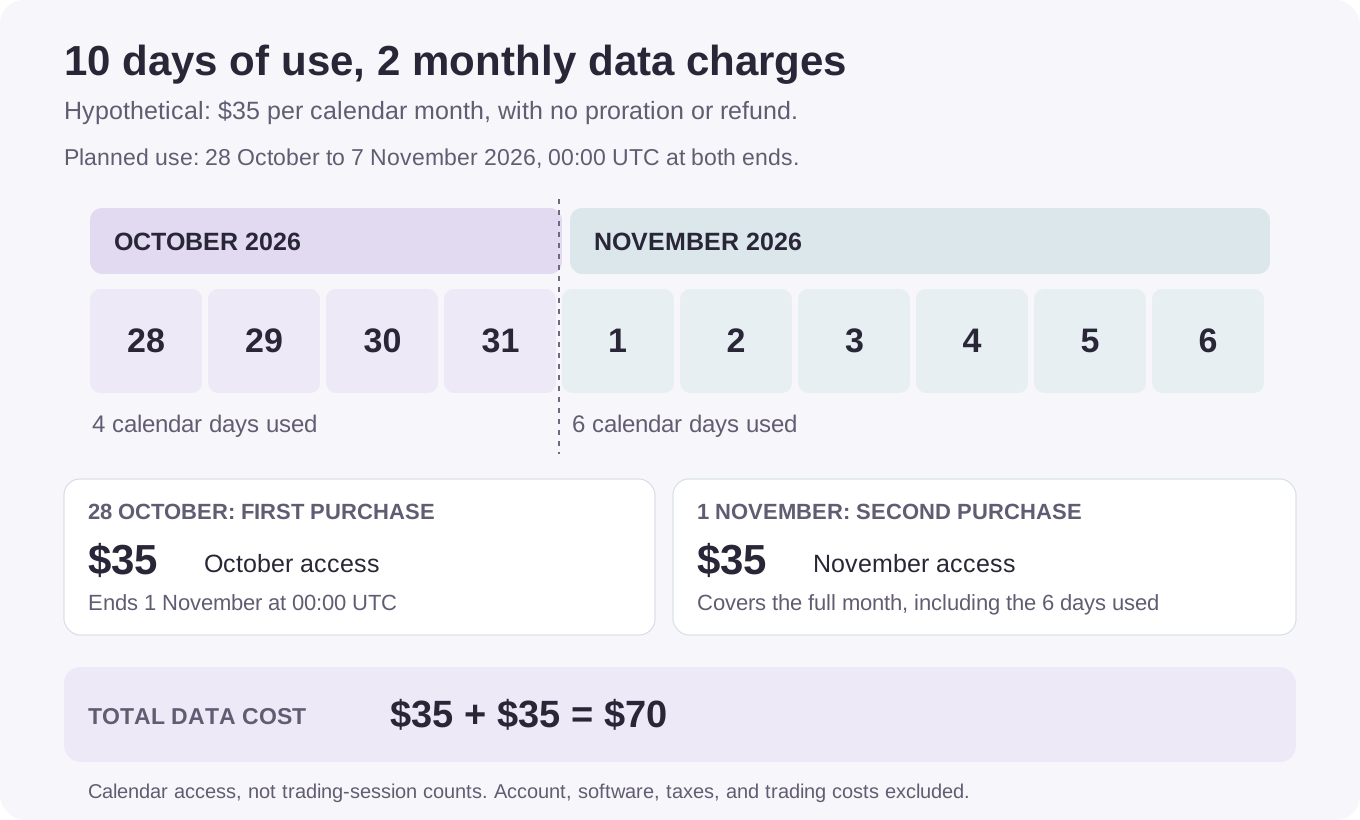
Here is a hypothetical example, using an invented $35 rate rather than a named firm's price. Assume:
- The data package costs $35 for each calendar month in which access is purchased, with no proration or refund.
- All billing boundaries use UTC in this example. October access ends at 00:00 on 1 November.
- Access is needed from 00:00 on 28 October 2026 until 00:00 on 7 November 2026, a ten-calendar-day interval.
- A second purchase is made at the November boundary. There is no December renewal.
- This calculation includes data charges only. Account fees, software, taxes, tools, and trading costs are outside the example.
| Event | Data charge | Cumulative data cost | What the purchase covers |
|---|---|---|---|
| 28 October: activate the package | $35 | $35 | The remaining four calendar days of October |
| 1 November: purchase November access | $35 | $70 | November, including the six more days needed in this example |
| 7 November: the planned period of use ends | $0 | $70 | No refund in this model; November access remains paid for |
Data cost = 2 charged calendar months × $35 = $70.
For a real purchase, confirm the billing timezone, proration, renewal method, and cancellation cutoff. Then add the data line to the complete cost inventory, counting each bundled item only once. Keep separate subscriptions visible: ending a prop firm account should prompt a check of any platform, data, and tool subscriptions billed elsewhere.
The broader subscription-versus-one-time-fee guide covers how account billing changes a multi-attempt budget.
Test the workflow you will actually use
Where a suitable free demo is available, use it to check the interface before purchasing. Confirm how closely that demo matches the paid account. Do not place an exploratory trade in a purchased challenge before checking whether doing so removes a switching option.
| Test | Evidence to keep |
|---|---|
| Sign in on the intended device | Correct account, server/connection, and environment; required authentication works |
| Open the intended instrument | Exact symbol, contract month where relevant, trading hours, and current data status |
| Use the required tools | The actual indicator or script runs; needed data and licensing are present |
| Rehearse order management in a suitable demo | Entry, stop/target placement, modification, partial close, and cancellation behave as expected |
| Check disconnection behavior | Document where orders and automation run, what persists after disconnection, and the supported recovery procedure |
| Reconcile records | Order IDs, fills, charges, timestamps, and exports can be matched to the account dashboard |
For futures, check the mini/micro counting and current position limit separately from the platform's order controls. A technically accepted order can still exceed the account's permitted combined position.
Verify the dated contract behind a continuous chart as part of that workflow. Recheck the actual order ticket and working orders when the displayed contract changes.
For protective orders and automated management, ask where each component is handled: the application, a hosted service, or the account's server. Do not assume that closing a chart, losing a connection, or closing the application has the same effect on every order type.
Also identify the support route before an incident. Record the account ID, application/version, connection, timestamp and timezone, order IDs, and any error message. A chart screenshot is useful evidence, but a firm's incident policy determines how it handles a claim. Do not build the purchase decision around an assumed reset or reimbursement.
What should you confirm before checkout?
Keep one short record for each candidate account:
- Access: the platform is offered for my country, program, stage, and selected connection.
- Workflow: the device, operating system, instruments, tools, order controls, and exports I need are supported.
- Data: I know which exchanges and data levels are included, and which subscriptions cover charts and order-panel quotes.
- Costs: I have listed each required purchase, billing period, renewal/cancellation rule, and potential funded-stage change.
- Changing or recovering the setup: I understand switching restrictions, the supported fallback, and the incident-reporting process.
Mark each item confirmed, conditional, or unresolved, and attach the relevant page or support answer with the check date. An unresolved feature that your trading process depends on is a reason to resolve the setup before paying. Tradeify's data guide, for example, rules out a refund when Level 2 or EUREX data is unavailable on the connection chosen at checkout.
Check regional platform access alongside the country, identity, and payout-access requirements. An available platform does not establish that you can complete funded onboarding or use the intended payout provider.
Add this record to the before-you-pay comparison worksheet. The useful outcome is a complete, costed setup that supports your process under the rules of the specific account.
Related reading
- EAs, copying, and multiple-account permissions, for the distinction between a working tool and an authorized use.
- Complete challenge costs, for placing data and platform charges in the wider purchase budget.
- Evaluation-to-funded account changes, for checking the setup again at a stage transition.
Sources and method
Official pages checked on 6 October 2026. Named examples retain the market, account-stage, region, and connection conditions relevant to the claim. Platform availability and fees can change; confirm the option shown for the intended purchase. The calendar illustration is an original hypothetical calculation, not a provider quote or a performance example.
- The5ers CFD platform FAQ, for platform selection and surcharge terms.
- The5ers mobile-access FAQ, for device and regional access, including web-only TradingView access.
- E8 available platforms, for choices by market, region, and account type.
- E8 platform switching, for challenge-stage switching conditions.
- Tradeify supported platforms, for connection-specific applications and changes.
- Tradeify Level 2 and EUREX availability, for data depth, the subscriber agreement, and missing-data refund restrictions.
- TradeDay data costs, for stage-dependent data and calendar-month billing.
- TradeDay funded fees, for the Funded Live payment charge.
- TradingView charting-library FAQ, for embedded-library and Pine Script limitations.
- TradingView additional data, for separate exchange-data subscriptions.
- TradingView quote sources, for chart and order-panel distinctions.
- TradingView broker-data verification, for conditional reuse of existing entitlements.