LearnChoosing a program
EAs, Copy Trading, and Multiple Accounts: What Needs Permission
Permission to use an EA or trade copier depends on the trading decisions it follows, the accounts it connects, and the rules of each account. A tool that copies your own trades can raise different questions from a signal service that follows someone else's decisions. Owning every connected account also does not remove capital limits or restrictions on coordinated positions.
On this page
Start by describing the full setup: who decides, who can operate it, where the orders originate, and which accounts receive them. Then check that setup for the exact program, stage, platform, and account size. A broad label such as “EAs allowed” cannot answer all of those questions.
This guide covers CFD/FX and futures programs. Named examples were checked on 6 October 2026. They illustrate specific permissions and restrictions, not a firm-wide compatibility ranking.
Automation and copying: what actually needs permission?
An Expert Advisor, or EA, is software associated with MetaTrader that can automate trading or trade management. Other platforms may offer algorithms, bots, scripts, or an API, a software connection through which a program can send instructions. A trade copier repeats activity from a source account into one or more receiving accounts.
Those descriptions explain what the tools do. They do not establish whether a particular use is permitted.
| Setup | Where the decision comes from | What to establish |
|---|---|---|
| Your automated strategy | Rules you design or independently control | Whether automation, its behavior, and its execution method are permitted |
| A purchased EA | Software supplied by a vendor | Whether that EA is permitted, how shared strategies are treated, and whether anyone else controls live decisions |
| Copying your own trades | Your source account | Whether every account is yours, the route is permitted, and account/allocation limits are satisfied |
| A signal service or another trader's account | Someone else's trading decisions | Whether external signals or third-party copying are permitted, even if you enter orders manually |
| Account management or a challenge-passing service | Someone operating or directing an account for you | Whether third-party access or trading is permitted; an EA permission does not answer this |
| A stop-management or sizing tool | Your trade, with software changing parameters | Whether the firm classifies that function as automation and restricts it |
A vendor writing software is a different role from a vendor choosing your next trades or operating your account. Describe the actual arrangement. Paying for software does not automatically make it account management, and retaining the password does not automatically make an external signal your own strategy.
Read-only analysis is another distinct function. If a tool only displays information, say so. If it can place, modify, or cancel orders, include those actions in the permission check. Avoid relying on a product's marketing name to describe its access.
Build a permission record for the whole setup
Check the source account and every receiving account separately. If two firms are involved, both sides need to permit their part of the arrangement. Approval from one firm does not authorize activity at another.
| Field | What to record |
|---|---|
| Account identity | Firm, market, program, stage, size, platform, and relevant purchase cohort |
| Ownership and control | Legal owner of each account; who selects trades, can access credentials, or can change the automation |
| Copy direction | Which account sends trades and which receives them; whether either side is external |
| Tool and functions | EA/copier name and version; entries, exits, stops, modifications, cancellations, and sizing |
| Execution location | Personal device, VPS, remote server, or hosted service; applicable device/IP conditions |
| Limits | Account-count cap, capital-allocation cap, strategy-level aggregation, and position limits |
| Other trading rules | News windows, holding restrictions, prohibited practices, and daily/max-loss conditions |
| Evidence | Applicable terms, detailed rule page, support clarification, and date checked |
Use a status such as permitted with stated conditions, prohibited, or unresolved. “The platform connects successfully” is a technical result, not a permission status.
Check that technical result separately using the platform, data, and tool checklist. It covers whether the account connection supports your application and tools, what data is included, and which subscriptions are needed.
Repeat this record when an evaluation becomes a funded-stage account. The evaluation-to-funded transition guide covers the wider set of rules that may need rechecking.
FTMO: copying your own trades is different from third-party trading
The public FTMO CFD pages cited here do not state an own-account copying permission. FTMO's support told us on 5 October 2026 that you may copy your own trades between your own accounts, provided the arrangement stays within its Maximum Capital Allocation limit and involves no manipulative trade combinations, such as opposite or hedging positions across accounts.
This is an own-trade, own-account permission. It should not be expanded into permission for another person to trade for you or coordinate trading with you. FTMO's public personal-use rules prohibit those third-party arrangements and prohibit trading on another person's account. Its forbidden-practices page also addresses manipulative combinations across accounts, including accounts with different providers. FTMO forbidden trading practices.
A support reply is not a published rule, and it does not replace the agreement for your account. Review the applicable FTMO terms and conditions for your own setup, and recheck the public pages before relying on the reply.
An EA permission does not remove strategy-level conditions
FTMO's CFD strategies FAQ permits algorithmic trading and EAs when the trading meets its rules and reflects real-market conditions. It also warns that other traders may already use the same third-party EA, and therefore the same strategy, so using one risks exceeding the maximum capital allocation and being denied the FTMO Account. The relevant question is therefore broader than whether you personally own only one account. FTMO permitted strategies and EAs.
Do not assume that changing an EA's name or a minor setting establishes a different strategy. Ask how the firm treats the actual trading behavior. These CFD examples do not establish the separate rules of FTMO Futures. Use the strategy-behavior checklist to read restrictions on orders, exposure and simulated execution alongside an EA permission.
The same setup can receive a different answer elsewhere
FundedNext CFDs: account stage and tool type matter
FundedNext's detailed copying rule permits copying between a trader's own Challenge Accounts, subject to a combined $300,000 limit and a designated source account. It prohibits copying involving its funded-stage FundedNext Accounts, including between accounts under the same ownership. It also distinguishes permitted VPS-based copying for those Challenge Accounts from prohibited external cloud copier services. FundedNext copy-trading rule.
Its CFD Challenge Terms additionally require written authorization and permission under the applicable program rules. Confirm how that requirement applies to the proposed connection, including the chosen software. FundedNext CFD Challenge Terms, section 8.9.
For Stellar Instant, the public evidence is inconsistent: the general rules page lists copying between your own Stellar Instant accounts as allowed, while the detailed copying article includes Stellar Instant in its prohibited funded-account treatment. That specific permission remains unresolved here and needs written clarification. FundedNext general CFD rules; detailed copying rule.
Automation has another set of conditions. FundedNext's EA article limits EA use to MT4/MT5 accounts below $50,000 with the applicable paid add-on, excludes cTrader and Match-Trader, and prohibits automated tools on accounts of $50,000 or more. Its definition also captures tools that only modify stops, targets, or lot-size calculations. Do not assume that a trade-management utility is exempt. FundedNext EA rules.
The two sets of rules meet when a copier runs as software on the receiving accounts. FundedNext's general CFD rules allow EAs and VPS use only on its $5,000 to $25,000 accounts, each with its own paid add-on, and its EA article requires each EA or bot to use a distinct strategy, avoiding identical trades across accounts. Its copying rules nevertheless permit VPS-based and local copiers between your own Challenge Accounts. These pages do not explain how a copier is treated on a $50,000 or larger Challenge Account, or whether the distinct-strategy rule applies to copied trades. Get written confirmation before connecting one. FundedNext general CFD rules; FundedNext EA rules.
TopstepX: the built-in copier has a defined scope
TopstepX's built-in Trade Copier is available for Trading Combine and Express Funded Accounts, excluding Live Funded Accounts. The lead must have the lowest Maximum Position Size in the connected group. Its documentation also warns that fills can differ and that switching off copying during an open trade flattens follower accounts. Learn the disconnection behavior before using it as an emergency control. TopstepX Trade Copier documentation.
TopstepX's API documentation separately permits custom bots subject to its trading rules, but excludes Live Funded Accounts from that API. It requires trading activity to originate from a personal device and prohibits order routing through VPS, VPN, or remote servers, while allowing specified read-only server functions. It warns that running automation on a VPS can lead to suspension or removal from the program. “Automation permitted” therefore does not mean “host it anywhere.” TopstepX API access.
Record any software, data, or access subscription in your complete cost inventory. Tool availability and the price of operating it are separate checks.
Tradeify: copying across accounts and direction restrictions
For its Evaluation, Sim Funded, and Elite Live accounts, Tradeify's hedging rule allows the same trades in the same direction across your accounts, which it describes as how copying works, but treats opposite positions in the same product group as a violation across every account you control, whatever the contract sizes. A long ES position in one account and a short NQ position in another both fall within its equity-index group. A violation can put every involved account into violation status. Tradeify hedging and correlated products.
Account count and capital allocation are different limits
An account-count limit answers how many accounts you may hold or operate. A capital-allocation limit answers how much stated allocation may be associated with a trader or strategy. Neither is the same as the current loss buffer on one account.
FTMO's CFD account FAQ states a maximum allocation of $400,000 per trader or strategy before scaling across the accounts and products covered by that FAQ, with specified equivalents for other base currencies. Premium Programme benefits can increase that allocation. It prohibits circumventing the limits through different registrations, and FTMO may suspend the affected accounts when identical or substantially similar trading, including trades copied from or based on the same third-party source such as a signal group or copy-trading service, takes their total above those limits. It also limits active FTMO Instant Account products to one. FTMO account and allocation limits.
For illustration, two unscaled USD FTMO Accounts of $200,000 each total $400,000. A third account of $50,000 would bring the total to $450,000, above that stated cap. Holding the same total in fewer, larger accounts does not cure an excess, and holding more accounts does not add allocation.
That arithmetic checks only the stated allocation. It does not approve the strategy, copying arrangement, or purchase of further evaluations. Confirm which account stages count before purchasing. Scaling follows its own conditions, and other currencies should use the firm's stated limits rather than an assumed live FX conversion. The capital-scaling and merging guide separates account growth and consolidation from the allocation ceiling.
Advertised allocation is also not money you can withdraw or lose. The account-size and opening-loss guide explains that distinction.
One copied trade can leave very different account buffers
Hypothetical example: one trader owns Accounts A and B, and copying is explicitly permitted. Both started at $100,000, with a static $90,000 overall equity threshold. Touching that threshold is a hard breach. Their earlier results differ, so current equity is $94,000 in A and $90,700 in B.
This example isolates overall max loss. Assume no daily rule, position cap, or other condition binds first. There is no account credit, withdrawal, or threshold update. A copied trade produces the same net $600 loss in each account, including all charges, with no worse floating loss before closing. Equal fills and losses are a simplifying assumption, not a copier promise.
| Checkpoint | Account A | Account B |
|---|---|---|
| Equity before the copied trade | $94,000 | $90,700 |
| Static max-loss threshold | $90,000 | $90,000 |
| Remaining buffer before the trade | $4,000 | $700 |
| Net result of the copied trade | −$600 | −$600 |
| Equity after the trade | $93,400 | $90,100 |
| Remaining buffer after the trade | $3,400 | $100 |
| Status after the trade | Active | Active, only $100 above the threshold |
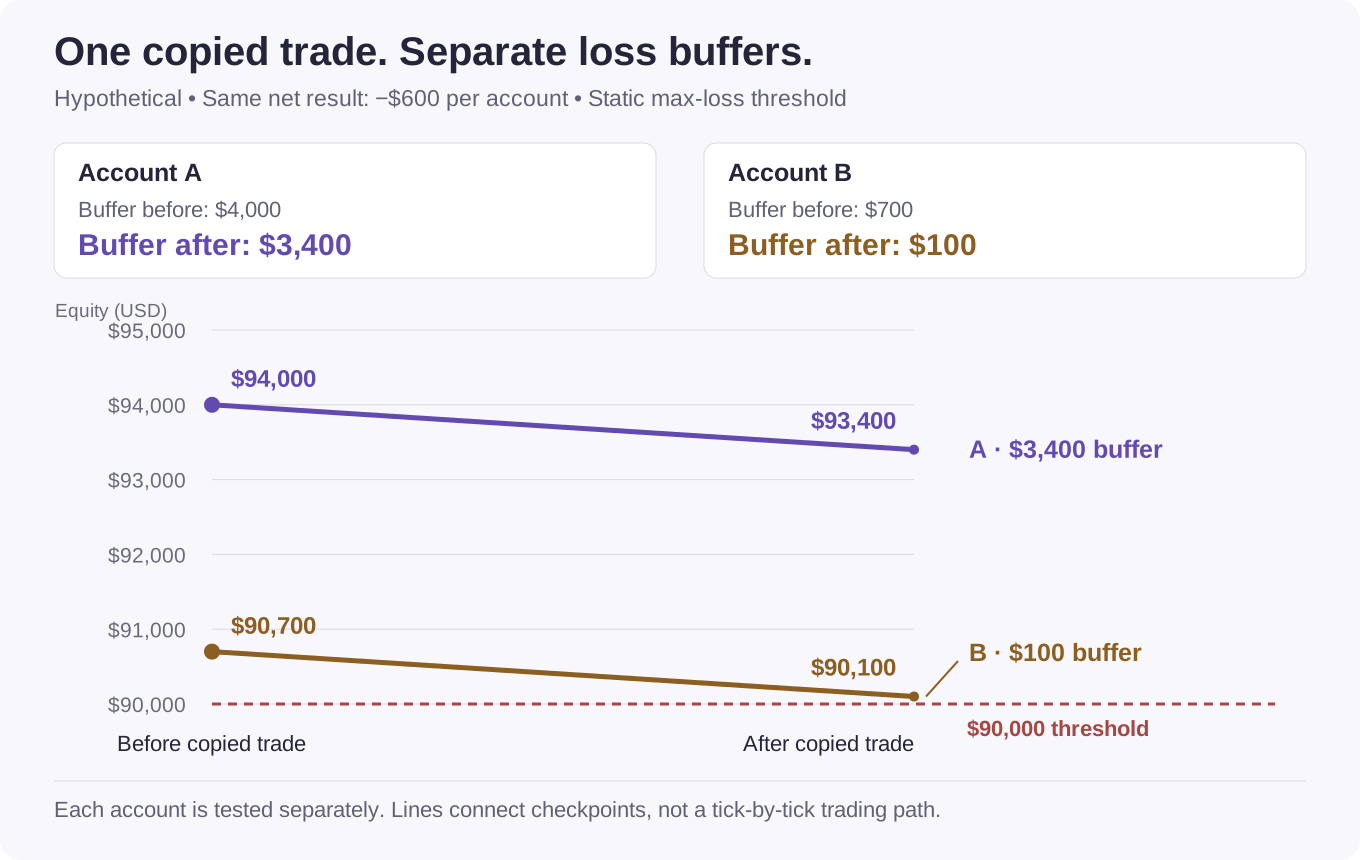
The calculation is remaining buffer = current equity − the applicable threshold. The combined $3,500 after the trade is only a sum for observation. It cannot be transferred to B. If B subsequently loses another net $100, its equity touches $90,000 and that account's valid path ends.
The example does not prescribe a trade size. It shows why copying based only on advertised account size can miss the account closest to its own limit. Review each account's current equity, relevant max-loss model, and separate daily-loss conditions. Matching trades do not make those states identical.
Check what the copier does when accounts diverge
Permission is the first check. Execution behavior is the next. Use the tool's documentation and a permitted practice environment to establish what happens when the source and receiving accounts stop matching.
| Situation to test | Question to answer |
|---|---|
| One order is rejected | Does the other account keep its position, and how are you notified? |
| A fill is delayed or partial | Are subsequent stop and exit instructions sized to the actual position? |
| An account reaches a loss limit | Which accounts close, stop receiving orders, or remain connected? |
| You disable the copier | Does it close positions, cancel pending orders, leave them in place, or behave differently by mode? |
| Connection is restored | Does it replay missed instructions or reconcile the positions already open? |
| A stage, payout, or scaling event occurs | Are permissions, account identifiers, limits, or copier links changed? |
Check the receiving account's positions and working orders, not just the source chart. A correct source instruction does not prove the destination accepted it or attached the intended exit. Keep platform and copier logs so an unexpected result can be reconstructed.
A copied order must also fit the receiving account's trading clock. A source account's permission to trade around news does not automatically extend to a funded-stage follower. Check news restrictions by order action, and make sure automatic entries, exits, and modifications are included. Apply each account's holding and session-cutoff conditions independently.
A problem in a copier is not automatic evidence that a firm will waive a breach. In TopstepX's case, its API documentation says third-party integrations are used at the trader's own risk and that a rule violation is treated the same whether it comes from manual trading or third-party automation. TopstepX API responsibilities.
Before connecting accounts, get a usable answer
Give support a description that can be answered for a specific configuration. For example:
I personally own and operate the following accounts: [firm, program, stage, size, platform, and account references]. I make the trading decisions in [source account] and want [tool and version] to copy [specified actions] into [receiving accounts]. The tool runs on [device or hosting setup]. No other person operates the accounts. Is this exact connection permitted at both stages, which account/allocation limits apply, and does it require an add-on or separate authorization?
Adapt that description truthfully if a vendor, signal provider, or another person is involved. Include any proposed connection to an external broker or prop firm. A reply about one pair of accounts should not be treated as approval for a larger network added later.
Before enabling the setup:
- Match the permission to the exact source, recipients, tool, and stage.
- Resolve differences between the agreement, public rules, and support response.
- Check account count, allocation, and any shared-strategy limits.
- Check each receiving account's current limits and trading permissions.
- Verify sizing, exits, rejected orders, disconnection behavior, and recovery in an allowed practice setup.
- Retain the evidence and recheck after a material account or tool change.
If the agreement, public rules, and support response still disagree, use the rule-conflict question template to ask which requirement applies to the exact account connection and what evidence resolves the difference.
Add the resulting permission record to the trading-permission entries of your before-you-pay comparison. If an essential part remains unresolved, keep that configuration marked unresolved rather than assuming the broadest interpretation of “allowed.”
Related reading
- Platforms and market data, for checking that the connection, tools, and data work before relying on a permission.
- Evaluation-to-funded account changes, for repeating the permission record after passing.
- Minis, micros, and contract limits, for counting each futures account's position when trades are copied into it.
Sources and method
Public rule pages below were checked on 6 October 2026. Access dates are not policy-effective dates. FTMO's support reply of 5 October 2026 is not a public page, so it is cited in the text rather than listed below. It does not replace an account's applicable agreement. FTMO's account-limits FAQ was rechecked on 13 October 2026.
- FTMO forbidden trading practices, for personal use, third-party trading, and manipulative cross-account arrangements.
- FTMO permitted strategies, for EAs and the shared-strategy warning.
- FTMO account limits, for the pre-scaling allocation, its scope, and the FTMO Instant Account limit.
- FundedNext copy-trading rule, for Challenge-account conditions, funded-stage restrictions, and copier distinctions.
- FundedNext general CFD rules, for the conflicting Stellar Instant statement and the EA and VPS account-size limit.
- FundedNext CFD Challenge Terms, for the written-authorization condition in section 8.9.
- FundedNext EA rules, for platform, size, add-on, distinct-strategy, and trade-management-tool conditions.
- TopstepX platform documentation, for the built-in copier's account scope and operating behavior.
- TopstepX API access, for automation, execution location, live-account exclusion, and responsibility.
- Tradeify hedging and correlated products, for same-direction copying and cross-account restrictions.
The permission record and execution checklist are editorial tools. The two-account ledger and figure are original hypothetical examples, independently recalculated from their stated assumptions. They are not observed trading results, program rankings, or suggested risk settings. CFD policies are not carried over to a firm's separate futures offering.